To renew your Illinois driver’s license online in 2026, you must receive a "Safe Driver Renewal" notice from the Secretary of State containing a unique Renewal Authorization Number. Visit the official Illinois Secretary of State website, enter your authorization number and license details, pay the required fee, and print your temporary document while your permanent card is mailed.
The process of maintaining a valid driver’s license in Illinois has undergone significant modernization. By 2026, the Illinois Secretary of State (SOS) office has fully integrated the "Skip the Line" program, prioritizing online services to reduce physical traffic at Driver Services Facilities. While the convenience of digital renewal is a major benefit for residents, the eligibility requirements are specific and strictly enforced to ensure road safety and identity security.
Eligibility Requirements for Online Renewal
Not every driver in Illinois is eligible to renew their license through the internet. The state utilizes the Safe Driver Renewal program to reward those with clean driving records. Eligibility is primarily determined by your driving history, age, and the type of license you currently hold.
The Safe Driver Renewal Program
To qualify for an online renewal in 2026, you must be classified as a "Safe Driver." This designation is granted to individuals between the ages of 22 and 74 who meet the following criteria:
- Clean Driving Record: You must not have any moving violations, speed-related offenses, or at-fault accidents on your record for the duration of your current license term.
- No Suspension or Revocation: Your driving privileges must be currently active and not subject to any legal holds or past DUIs.
- Valid License Type: This service is generally reserved for Class D (standard passenger vehicle) and Class M (motorcycle) licenses. Commercial Driver’s License (CDL) holders are typically excluded from online renewal due to federal medical certification and testing requirements.
Age-Based Restrictions
Age plays a critical role in the Secretary of State’s safety protocols. Drivers aged 75 and older are required by Illinois law to complete an in-person road test to renew their driving privileges. Consequently, these individuals cannot use the online portal. Furthermore, drivers under age 22 are often required to visit a facility in person to update their photograph or transition from a graduated license to a full adult license.
Vision and Medical Requirements
Every eight years, Illinois drivers are required to undergo a vision screening. If your current renewal cycle coincides with this mandatory screening, you will be ineligible for online renewal and must visit a facility. Additionally, if you have a medical condition that has changed and may impact your ability to drive safely, you are legally obligated to report this in person or through the Medical Review Board, bypassing the online system.
Prerequisites and Necessary Information
Before navigating to the Illinois Secretary of State (ILSOS) portal, you must gather specific information. Missing data can result in a timed-out session or the inability to access the renewal form.
- Renewal Authorization Number (PIN): This is the most critical piece of information. The SOS office mails a renewal notice to your address on file approximately 60 to 90 days before your license expires. This notice contains a unique 8-to-10-digit authorization number. If you have opted for paperless notifications, this PIN will be sent to your registered email address.
- Current Driver’s License Number: You will need the number found on your physical card.
- Social Security Number (SSN): For identity verification, you must provide the last four digits of your SSN.
- Payment Method: The online portal accepts major credit cards (Visa, MasterCard, Discover, and American Express) and electronic checks (e-checks). Note that credit card transactions in 2026 continue to incur a small convenience fee processed by the third-party payment vendor.
- Printer or Digital Storage: Upon completion, you will be issued a temporary secure paper license. You must be able to print this or save it to your mobile device immediately.
Step-by-Step Guide to the Online Process
The ILSOS online portal is designed for high-volume traffic and user efficiency. Follow these steps to ensure your application is processed without error.
Step 1: Access the Official Portal
Navigate to the Illinois Secretary of State website. Look for the "Online Services" tab or the prominent "Driver’s License/ID Card Renewal" link. Ensure you are on a .gov domain to avoid fraudulent "middleman" websites that charge unnecessary service fees.
Step 2: Enter Authorization Data
Input your Renewal Authorization Number and your current driver’s license number exactly as they appear on your documents. If the system does not recognize your PIN, it may be because you are not eligible for the Safe Driver program this cycle, or your license has already expired beyond the grace period.
Step 3: Verify Personal Information
The system will display your name and address. In 2026, the SOS allows minor updates online, but if you have moved, you must have updated your address with the Secretary of State at least 10 days prior to attempting the renewal. You cannot change your legal name through the online portal; this requires a visit to a facility with legal proof of the name change (e.g., a marriage certificate or court order).
Step 4: Complete the Health and Safety Questionnaire
You will be asked a series of "Yes/No" questions regarding your physical health, mental health, and any recent legal issues involving your driving. Honesty is paramount, as providing false information on a state document is a felony.
Step 5: Process Payment
Review the fee structure (see the table below) and enter your payment details. Once the transaction is authorized, do not close the browser window. Wait for the confirmation page to load completely.
Step 6: Print Your Temporary Document
Illinois uses a "central issuance" system. This means you do not receive your permanent card immediately. The confirmation page will provide a link to a Temporary Secure Paper Driver's License. This document is valid for 90 days and must be carried with your expired or expiring plastic card until the new one arrives.
Illinois Driver's License Fees in 2026
The cost of renewal depends on the driver’s age and the type of license being renewed. Below is a breakdown of the standard fees as of 2026.
| Applicant Category | Renewal Fee | Validity Period |
|---|---|---|
| Drivers Aged 21–68 | $30.00 | 4 Years |
| Drivers Aged 69–80 | $5.00 | 2 Years |
| Drivers Aged 81–86 | $2.00 | 2 Years |
| Drivers Aged 87 and Older | Free | 1 Year |
| Drivers Aged 18–20 | $5.00 | 3 Years (until age 21) |
| Duplicate/Corrected License | $5.00 | Remains same as original |
Note: Electronic payments typically involve a processing fee of approximately 2.25% or a minimum of $1.00.
REAL ID vs. Standard License in 2026
By 2026, the federal deadline for REAL ID enforcement (which was May 7, 2025) has already passed. This means that if you intend to use your driver’s license to board a domestic flight or enter a secure federal building, your license must be REAL ID compliant.
Renewing a REAL ID Online
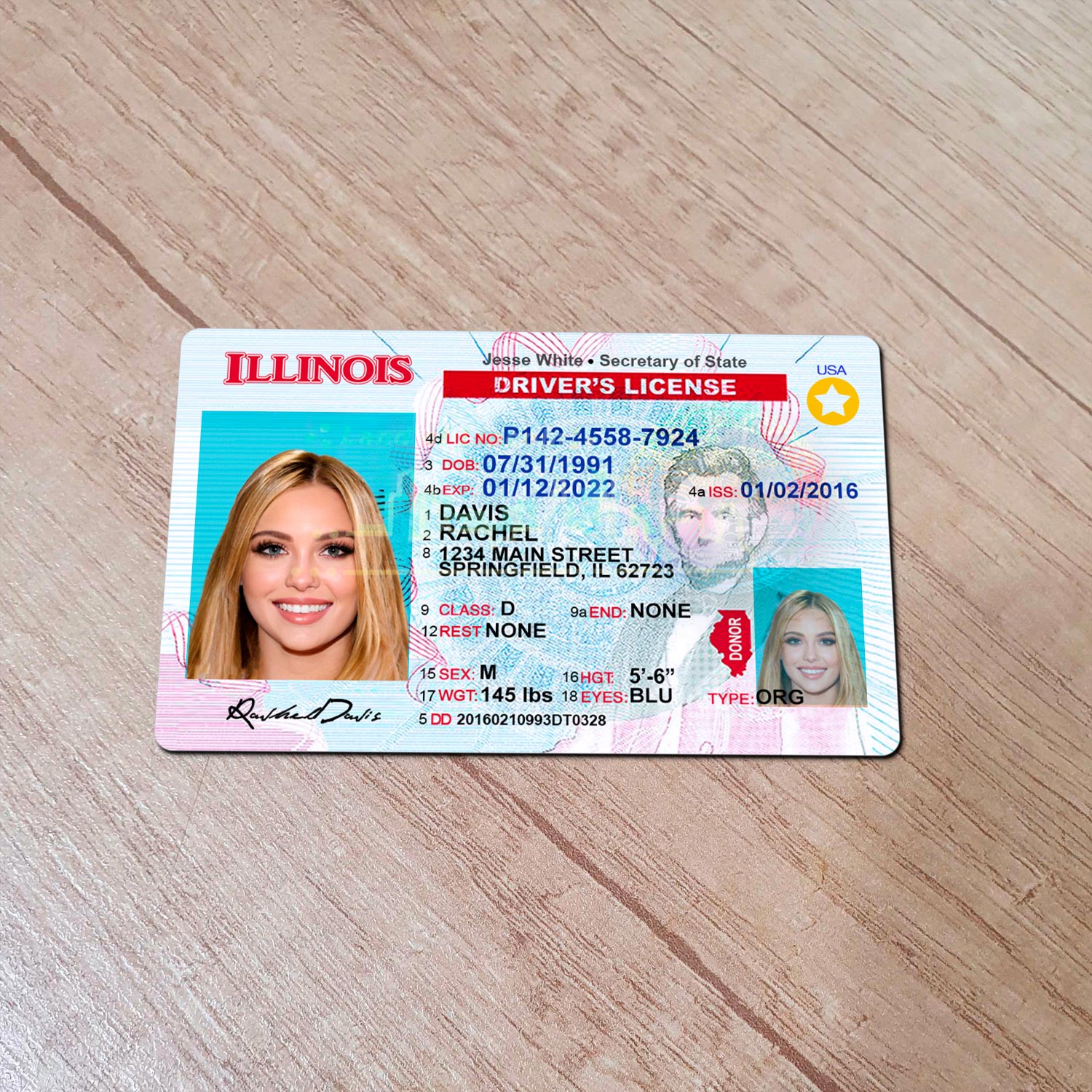
If you already possess an Illinois REAL ID (identified by the gold star in the top right corner), you can renew it online just like a standard license, provided you remain a "Safe Driver." The state already has your verified documents (birth certificate, social security card, and residency proof) on file from your initial REAL ID application.
Upgrading to a REAL ID
If you currently hold a standard license and wish to upgrade to a REAL ID during your 2026 renewal, you cannot do this online. Federal law requires an in-person visit for the initial issuance of a REAL ID to verify the physical authenticity of your identity documents. If you renew online, you will receive a "Standard" license, which will be marked with "Federal Limits Apply."
Troubleshooting Common Online Renewal Issues
Even with a streamlined system, users often encounter technical or administrative hurdles.
Lost or Missing Renewal Authorization Number
If you did not receive your notice or lost it, you may still be able to retrieve your PIN. The SOS website offers a "PIN Retrieval" tool under the driver’s services section. You will need to enter your license number and the last four digits of your Social Security Number. If the system says "No PIN available," you are likely required to visit a facility in person.
Address Inconsistency
The Secretary of State will only mail your new license to the address currently on file. If you have moved and did not update your record, do not renew online. Your permanent card will be returned as undeliverable by the USPS, and the SOS will not forward it. You must update your address via the SOS website first and wait for the system to process the change before renewing.
Website Time-Outs and Errors
The ILSOS portal is heavily encrypted. If you are using a VPN or an outdated browser, the payment gateway may fail. Ensure your browser is updated to the latest version and disable any high-security extensions that might block "pop-ups," as the temporary license often generates in a new window.
Post-Renewal: What to Expect
Once you have successfully submitted your application and printed your temporary license, the Secretary of State’s office begins the fraud review and production phase.
- Fraud Review: Every online renewal undergoes a brief automated and sometimes manual review to check for facial recognition matches with the photo on file and to verify the payment.
- Mailing Timeline: Your permanent, high-security polycarbonate license is printed at a central facility and sent via the U.S. Postal Service. You should expect it to arrive within 15 business days.
- Verification: If your permanent card does not arrive within 30 days, you can check the status on the Secretary of State’s Check Status page.
Frequently Asked Questions
Can I renew my license online if it is already expired?
In 2026, you can generally renew online if your license has been expired for less than one year, provided you still have a valid Renewal Authorization Number. However, you cannot legally drive until you have the temporary document in hand. If your license has been expired for more than a year, an in-person visit and testing are required.
I need a new photo. Can I upload one online?
No. Illinois does not allow users to upload their own photos for driver's licenses. The SOS uses the photo already on file from your last in-person visit. If your photo is more than 8 to 12 years old (depending on specific SOS cycles), the system will flag you for an in-person renewal to capture a new image.
Is the temporary paper license valid for air travel?
While the temporary paper license is a valid legal document for driving in Illinois, TSA policies regarding paper documents can be strict. Since the REAL ID deadline has passed, a paper temporary license is generally not accepted as a primary form of ID for boarding aircraft. You should use a valid U.S. Passport or wait for your permanent plastic card to arrive before flying.
What happens if I am an organ donor?
Your current organ donor status will remain the same when you renew online. If you wish to join the Illinois Organ/Tissue Donor Registry for the first time during your renewal, the online form will provide a checkbox to opt-in. This status will then be printed on your new permanent license.
Can I renew a vision-restricted license online?
If your license has a "J" restriction or other medical indicators that require periodic re-evaluation, you are usually ineligible for the Safe Driver Renewal program. These restrictions often mandate an in-person vision or medical screening every renewal cycle to ensure the driver is still capable of operating a vehicle safely with corrective lenses.
Final Recommendation for Illinois Residents
If you receive a Safe Driver Renewal notice in 2026, taking advantage of the online system is highly recommended to save time and avoid the necessity of a DMV appointment. However, always verify that your mailing address is current before starting. If you require a REAL ID for travel and do not yet have the gold star on your card, bypass the online system and schedule an appointment at a "Skip the Line" facility to complete a full identity verification.