To cancel Uber, you must determine if you are stopping a specific ride, ending an Uber One subscription, or deleting your entire account. Rides can be canceled within the app by selecting "Cancel Trip," though fees may apply. Subscriptions and account deletions are managed through the "Account" and "Privacy" menus respectively.
The term "cancel Uber" is broad, often representing three distinct user intents: stopping a ride in progress, terminating a recurring paid membership, or permanently removing a user profile from the platform. As of 2026, Uber’s interface has become more integrated, meaning that actions taken on the primary Uber app frequently affect Uber Eats and other subsidiary services. Navigating these options requires an understanding of the platform's current fee structures, data retention policies, and subscription cycles.
How to Cancel an Uber Ride in Progress
Canceling a ride request is the most common task for users. Whether you realized the wait time is too long or your plans changed immediately after tapping "Request," the window for cancellation is narrow if you wish to avoid financial penalties.
Steps to Cancel a Standard Ride
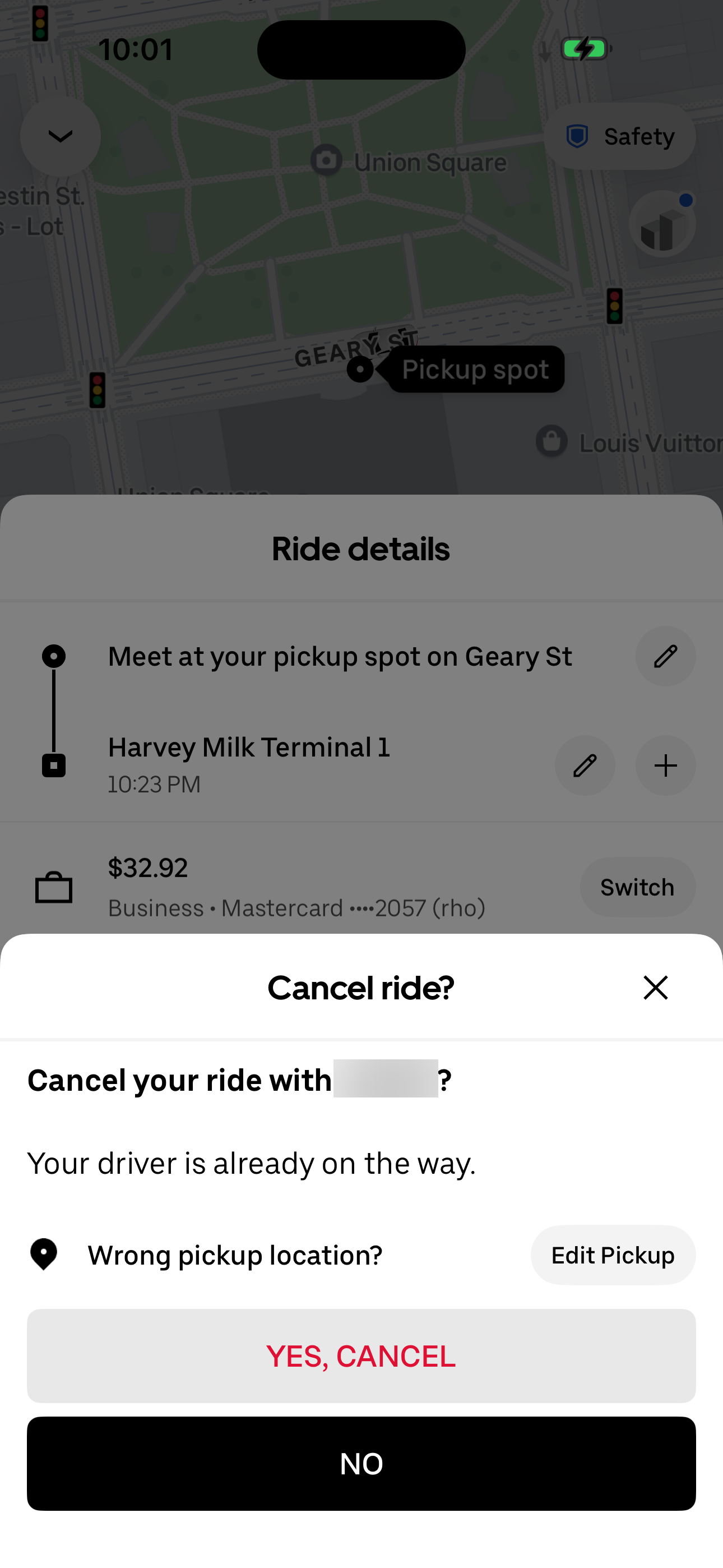
When you request a ride, the app immediately begins searching for a driver. Once a driver accepts the request, a legal and financial contract is initiated. To cancel:
- Locate the ride status bar: At the bottom of your screen, tap the bar showing your driver’s information.
- Select "Cancel Trip": This button is usually located in the bottom left or within a secondary menu "Edit/Cancel."
- Confirm the Cancellation: The app will ask if you are sure. It may display a warning if a cancellation fee is about to be charged.
Understanding Uber Cancellation Fees
In 2026, cancellation fees remain a vital component of the driver compensation model. These fees are designed to reimburse drivers for the time and fuel spent traveling toward your location.
- The Grace Period: Generally, you have a 2-to-5-minute window after a driver accepts your request to cancel without a fee. If the driver is significantly behind their estimated arrival time, Uber often waives this fee automatically.
- The Wait Time Fee: If a driver arrives at your pickup location and waits for several minutes (typically more than 2-5 minutes depending on the service level like UberX or Uber Black), you will be charged a fee even if you eventually cancel the ride.
- Uber Reserve: For scheduled rides, the cancellation policy is stricter. Canceling a Reserved ride less than 60 minutes before the scheduled pickup typically results in the full fare being charged to compensate the driver who committed to that specific time slot.
Disputing a Cancellation Fee
If you believe you were charged a cancellation fee unfairly—for example, if the driver was driving in the opposite direction or never moved—you can request a refund. Navigate to Activity, select the canceled trip, and use the "Get Ride Help" feature to report an issue with the fee. Uber’s automated systems usually review the GPS data of the vehicle to determine if a refund is warranted.
Canceling Uber One Subscriptions
Uber One is the consolidated membership program that provides discounts on both rides and Uber Eats deliveries. Because this is a recurring billing service, simply deleting the app from your phone will not stop the charges.
The 48-Hour Rule
As of 2026, Uber requires members to cancel their Uber One subscription at least 48 hours before the next scheduled payment. Failure to do so may result in the charge for the following month being processed, as the billing cycle often initiates a "hold" or processing phase two days prior to the actual renewal date.
Steps to Terminate Membership
- Open the Uber App: Ensure you are logged into the account associated with the subscription.
- Tap "Account": Located in the bottom right corner of the home screen.
- Select "Uber One": This section displays your current benefits and renewal date.
- Manage Membership: Scroll to the bottom and select "End Membership."
- Confirm and Provide Feedback: Uber will often offer a "pause" option or a discounted rate to keep you subscribed. To fully cancel, you must continue through the prompts until you receive a confirmation screen and an email notification.
Upon cancellation, your benefits will typically remain active until the end of the current billing period. You will not receive a prorated refund for the remaining days of the month unless required by local consumer protection laws.
Permanently Deleting an Uber Account
If you wish to "cancel Uber" by removing your digital footprint entirely, you must use the account deletion tool. This is a permanent action that affects all services tied to your Uber ID, including Uber Eats, Uber Freight, and any driver profiles.
The 30-Day Recovery Period
When you submit a request to delete your account, Uber does not purge the data immediately. Instead, the account is deactivated for 30 days. During this period, you can reactivate the account simply by logging back in. This "cooling off" period is designed to prevent accidental deletions or unauthorized access from causing permanent data loss.
How to Delete via the App
- Navigate to Account > Settings.
- Select Privacy and then Privacy Center.
- Scroll down to the Account Deletion section.
- Follow the verification steps (this usually involves entering a code sent to your phone or email).
What Happens to Your Data?
After the 30-day period, Uber begins the process of permanently deleting your personal information. However, they are legally required to retain certain data—such as trip history, transaction records, and safety reports—for specific periods to comply with tax laws, regulatory requirements, and insurance audits. This information is typically moved to a "cold storage" environment where it is no longer associated with an active user profile.
Comparing Cancellation Types
The following table outlines the differences between the three primary ways to cancel Uber services.
| Feature | Ride Cancellation | Uber One Cancellation | Account Deletion |
|---|---|---|---|
| Primary Method | "Cancel Trip" in app | "Manage Membership" | Privacy Center |
| Financial Impact | Potential flat fee ($5–$10) | Stops future recurring billing | Loss of all unused Uber Cash/Rewards |
| Time Constraint | Immediate or 2-5 min window | 48 hours before renewal | 30-day deactivation period |
| Reversibility | Must request a new ride | Re-subscribe anytime | Reversible only within 30 days |
| Linked Services | Only affects that specific ride | Stops Eats & Ride benefits | Deletes Uber & Uber Eats profiles |
Canceling as an Uber Driver
For those who have been driving for the platform, "canceling Uber" involves deactivating a partner account. This process is handled through the Uber Driver app rather than the standard rider app.
- Complete or Cancel Pending Trips: You cannot delete a driver account with active trips or outstanding payments.
- Access Account Settings: In the Driver app, go to the menu and select "Account."
- Submit Deactivation Request: Drivers may need to contact Uber Support directly through the "Help" section to initiate a permanent deactivation of their partner profile.
It is critical to download all tax documents (such as 1099-K or 1099-NEC forms) before initiating account deletion, as you may lose access to the driver dashboard once the process is finalized.
Troubleshooting Common Cancellation Issues
"I can't see the Cancel button"
If a ride is already in the "Arriving Now" or "Started" phase, the cancellation button may be hidden behind the driver's profile or trip details. If the ride has already started, you cannot cancel it through the standard interface; you must ask the driver to pull over in a safe location and end the trip.
"I was charged after I canceled Uber One"
This usually happens for one of two reasons:
- The cancellation was performed less than 48 hours before the billing date.
- You have multiple Uber accounts (perhaps one linked to a work email) and the subscription is active on the other one. Verify your email receipts to see which account is being charged. If the charge occurred despite a timely cancellation, you can submit a screenshot of your cancellation confirmation to Uber Support for a refund.
"My account is 'On Hold' and I can't delete it"
Uber will prevent account deletion if there is an outstanding balance, an ongoing safety investigation, or a pending dispute. You must resolve these issues with the trust and safety team before the platform will allow you to purge your data.
Frequently Asked Questions
Does deleting the Uber app cancel my Uber One subscription?
No, deleting the application from your smartphone does not terminate your subscription. The membership is tied to your account on Uber’s servers, not the software on your device. You must manually end the membership in the "Uber One" section of the account settings or via the Uber website to stop future billing.
Can I get a refund for a ride cancellation fee?
Yes, refunds are possible if the cancellation was caused by driver error. Common scenarios include the driver not moving toward your location, the driver picking up another passenger, or the driver requesting that you cancel the ride so they don't have to. You can request a review via the "Activity" tab in the app.
What happens to my Uber Cash when I cancel my account?
If you delete your account, any remaining Uber Cash or promotional credits are generally forfeited. Uber does not provide cash refunds for balances purchased through the app or received via gift cards upon account closure. It is highly recommended that you spend your balance before initiating the deletion process.
If I cancel an Uber Eats order, does it cancel my Uber ride?
No, Uber Eats and Uber Rides operate as separate transactions within the same ecosystem. Canceling a food delivery will not affect a scheduled or current ride. However, the cancellation policies for Uber Eats are often stricter, especially if the restaurant has already begun preparing the food.
Can I cancel a scheduled Uber Reserve ride?
You can cancel a Reserved ride at any time, but to avoid a significant cancellation fee, you must do so at least 60 minutes before the scheduled pickup time. Because drivers for Reserve rides are often compensated for their "deadhead" time (traveling to you), the fees for late cancellations are typically higher than standard ride fees.
Final Recommendation
When canceling any service within the Uber ecosystem, always secure a confirmation. For ride cancellations, ensure the map clears and returns to the request screen. For subscriptions and account deletions, look for a confirmation email. If you are canceling to save money, consider "pausing" your Uber One membership or switching to a "lite" version of the app if available in your region, as this preserves your ride history and ratings while reducing data usage and background activity.