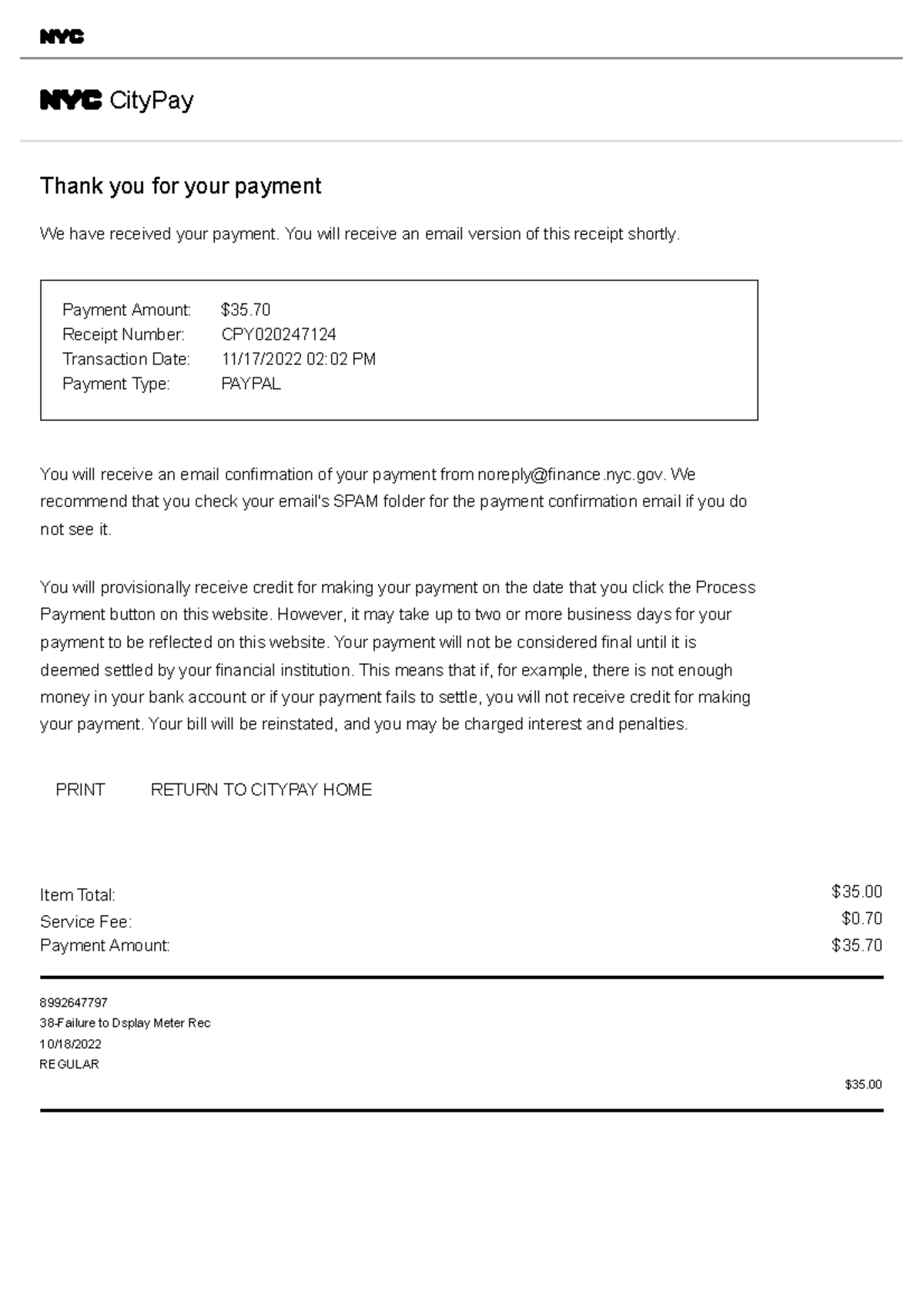
CityPay NYC is the official centralized payment portal for the City of New York, allowing residents and businesses to settle property taxes, parking violations, water bills, and municipal fines online. Managed by the NYC Department of Finance, the platform supports credit cards, debit cards, and eChecks to provide a secure, streamlined alternative to in-person payments or traditional mail.
Understanding the CityPay NYC Ecosystem
In 2026, CityPay NYC remains the primary digital interface for financial transactions between the public and New York City’s various administrative departments. Rather than navigating a dozen different agency websites, users can access CityPay to resolve debts ranging from a simple parking ticket to complex commercial rent taxes. The portal is designed to act as a secure gateway, integrating data from the Department of Finance (DOF), the Department of Environmental Protection (DEP), and the Office of Administrative Trials and Hearings (OATH).
The system’s primary value lies in its real-time processing capabilities. When a payment is made through CityPay, the relevant agency’s database is typically updated within 24 to 48 hours, significantly reducing the risk of late fees or legal escalations compared to paper-based systems. As the city moves toward a fully "Digital First" infrastructure in 2026, understanding the nuances of CityPay is essential for every New Yorker.
Primary Payment Categories Supported by CityPay
CityPay is not a monolithic payment tool but a collection of specialized modules. Depending on what you owe, the information required for search and verification will vary.
1. Parking and Camera Violations
This is the most frequently used section of CityPay. It covers standard parking tickets issued by the NYPD or Department of Transportation, as well as automated enforcement violations like red-light camera fines, school zone speed camera tickets, and bus lane violations.
To pay these, you generally need the 10-digit violation number. If you have lost the ticket, the system allows you to search by license plate number, state of registration, and vehicle type. In 2026, the portal also provides links to view the images or videos associated with camera-based violations before you commit to payment.
2. Property Taxes and Assessments
Property owners use CityPay to manage their quarterly or semi-annual tax bills. The system requires the Borough, Block, and Lot (BBL) number to identify the specific parcel of land. CityPay allows for "Partial Payments," which is a critical feature for homeowners managing their cash flow, though interest will still accrue on any unpaid balance after the official deadline.
3. Water and Sewer Charges
Linked directly with the DEP, this module requires your 13-digit account number. Because water bills in NYC are often based on meter readings that occur at different intervals, CityPay provides a detailed breakdown of the consumption period you are paying for, helping to prevent double-billing.
4. OATH and ECB Fines
Violations issued by the Environmental Control Board (ECB)—such as improper trash disposal, noise complaints, or construction site safety issues—are adjudicated through OATH. CityPay handles the financial settlement of these penalties once a "Guilty" plea is entered or a hearing officer has issued a decision.
5. Business Taxes and Licensing
From the Commercial Rent Tax to Hotel Room Occupancy Tax, business entities use a specialized branch of CityPay that often integrates with the NYC Business portal. These payments usually require an EIN (Employer Identification Number) or a specific NYC-issued account ID.
Prerequisites: What You Need Before You Start
To ensure a successful transaction and avoid session timeouts, gather the following documentation before accessing the CityPay website:
- Reference Numbers: This is the most common point of failure for users. You must have the specific violation number, account number, or BBL number. Searching by "Name" is generally not supported for privacy and accuracy reasons.
- Payment Method Details: If using a credit or debit card, have the CVV code and billing zip code ready. For eCheck (Electronic Check), you will need your bank's 9-digit routing number and your specific account number.
- Email Address: While some payments can be made "as a guest," providing a valid email address is the only way to receive an instant digital receipt, which serves as your legal proof of payment if a technical error occurs.
- Stable Connection: Because the NYC.gov payment gateways use high-level encryption (TLS 1.3 in 2026), a stable internet connection is required to prevent "handshake" errors that can lead to double-charging or interrupted transactions.
Step-by-Step Guide to Making a Payment
The CityPay interface is designed for linear progression. Follow these steps to ensure your payment is applied correctly:
- Access the Official Portal: Navigate to the official NYC.gov CityPay page. Always verify that the URL ends in
.govto avoid phishing sites that mimic the city’s payment interface. - Select Your Category: Choose the specific type of bill you are paying (e.g., "Parking Tickets" vs. "Property Taxes"). Selecting the wrong category will result in the system being unable to find your record.
- Search for the Debt: Enter your reference number (Violation #, BBL, or Account #). Click "Search" or "Add to Cart."
- Verify the Amount: The system will display the outstanding balance, including any interest or penalties accrued up to the current date in 2026. You can often choose to pay the "Total Amount Due" or enter a "Custom Amount" for partial payments.
- Choose a Payment Method: Select between Credit/Debit Card or eCheck. Note the convenience fees associated with each (discussed below).
- Enter Payment Data: Fill in your financial details on the secure payment screen.
- Review and Submit: A summary page will appear. Double-check that the violation number and the payment amount are correct. Click "Submit."
- Save the Confirmation: Once the transaction is complete, a confirmation number starting with "CP" or "NYC" will appear. Print this page or send the receipt to your email immediately.
Fee Structures and Payment Methods (2026 Guidelines)
One of the most important aspects of using CityPay NYC is understanding the cost of convenience. The City of New York is legally required to pass on the processing costs of credit card transactions to the consumer.
Credit and Debit Cards
Most major cards—including Visa, MasterCard, American Express, and Discover—are accepted. In 2026, the standard convenience fee for property-related payments and fines typically ranges from 2.00% to 2.49% of the total transaction amount. For a $1,000 property tax payment, this can add $20 to $25 to your bill.
eCheck (Electronic Check)
For many, eCheck is the preferred method because it often carries no additional fee or a very small flat fee (usually under $1.00). By entering your routing and account numbers, the funds are withdrawn directly from your checking or savings account. This is the most cost-effective way to pay large bills like property taxes.
Mobile Wallets
As of 2026, CityPay has integrated support for major mobile wallets. If you are accessing the portal via a smartphone, you can often use biometric authentication (FaceID or Fingerprint) to authorize the payment via your stored cards. However, the same percentage-based convenience fees for credit cards still apply to these transactions.
Comparison of Payment Methods on CityPay NYC
| Feature | Credit Card | Debit Card | eCheck (ACH) |
|---|---|---|---|
| Processing Fee | ~2.49% | ~2.49% (often same as credit) | $0.00 (Standard) |
| Processing Speed | Instant Authorization | Instant Authorization | 1–3 Business Days |
| Risk of Bounce | Low (Limit-based) | Moderate (Balance-based) | Moderate (Balance-based) |
| Best For | Emergency/Late Payments | Small Fines | Large Taxes/Water Bills |
| Receipt Timing | Immediate | Immediate | Immediate (Pending) |
Security and Fraud Prevention
Given the high volume of financial data handled by CityPay, security is a paramount concern. In 2026, the portal employs multi-layer protection:
- Encryption: All data transmitted is protected by 256-bit encryption.
- No Data Retention: For guest users, the City of New York does not store your full credit card number or bank account details after the transaction is finalized.
- Official Verification: Always ensure the browser’s address bar displays the padlock icon and the domain
https://www.nyc.gov/citypay.
Caution: The City of New York will never text you a direct link to a payment page requesting your credit card information to "avoid immediate arrest." These are common phishing scams. Always initiate your session by typing the address directly into your browser.
Troubleshooting Common CityPay Issues
Even with a robust system, users may encounter hurdles. Here is how to resolve the most frequent problems:
"Violation Not Found"
This usually happens for one of three reasons:
- Entry Error: You have mistyped the 10-digit number.
- Lag Time: It can take up to 4 days for a hand-written ticket to be uploaded into the digital system. If you just received the ticket this morning, wait a few days.
- Jurisdiction: You may be trying to pay a New York State Thruway toll or a private parking lot fine on a City of New York portal.
"Payment Declined"
If your card is declined but you have sufficient funds, it is likely due to the "Convenience Fee" push-back. Some banks flag the two-part transaction (the bill plus the fee) as suspicious. Contacting your bank to pre-authorize the "City of NY" as a vendor can solve this.
Missing Receipts
If you closed your browser before the confirmation page loaded, check your email (including the spam folder). If no email arrives, do not immediately attempt the payment again, as this may result in a double charge. Instead, wait 24 hours and check the NYC Department of Finance's "Account History" to see if the balance has been updated.
Legal and Financial Implications of Using CityPay
Paying through CityPay is legally equivalent to an admission of "Guilty" for parking and camera violations. Once the payment is processed, you waive your right to a hearing or an appeal for that specific violation. If you intend to dispute a ticket, do not pay it first. You must submit your dispute through the "NYC Pay or Dispute" app or the DOF website.
For property taxes and water bills, using CityPay ensures you meet the deadline to avoid the city’s high interest rates. In 2026, the interest rate for late property tax payments for properties with an assessed value over a certain threshold can exceed 10% annually, compounded daily. Timely use of the portal is the most effective way to avoid these compounding costs.
Note: This guide is for informational purposes. For specific legal or financial advice regarding municipal debts or tax law in New York City, consult with a qualified professional or the New York City Department of Finance directly.
FAQs About CityPay NYC
Can I pay multiple tickets at once on CityPay?
Yes. CityPay features a "Shopping Cart" functionality. After searching for one violation and adding it to your cart, you can select "Add More" to input additional violation numbers or search for all tickets associated with a specific license plate. This allows you to settle all outstanding debts in a single transaction and a single convenience fee calculation.
What should I do if I paid the wrong ticket by mistake?
If you accidentally paid a ticket that was not yours, or entered the wrong BBL number for a property tax payment, you must contact the NYC Department of Finance (DOF) immediately to request a "Payment Redirection" or a refund. This process cannot be done through the CityPay portal itself and usually requires a formal written request with proof of the transaction and the intended account.
Does CityPay accept international credit cards?
Generally, yes. CityPay accepts most major international credit cards, provided they are part of the Visa, MasterCard, or American Express networks. However, your card issuer may charge an additional "Foreign Transaction Fee" on top of the City’s convenience fee. Additionally, ensure your bank allows "Card Not Present" transactions for United States government entities.
How long does it take for a payment to show as "Satisfied" or "Paid"?
While you receive a confirmation receipt immediately, the actual "status" of the violation or tax bill in the public database usually updates within 24 to 48 hours. If you are paying a "Judgment" ticket to get a vehicle released from a tow pound, the CityPay receipt is usually accepted as proof of payment on the spot.
Are there any discounts for paying early through CityPay?
The City of New York does not typically offer "early bird" discounts for parking tickets or fines. However, for property taxes, paying before the deadline ensures you avoid high interest penalties. Some specific programs, like the "Early Payment Discount" for property taxes, are applied automatically to your bill if paid by the specified date in the fiscal year.
Next Steps for Users
If you have an outstanding debt with the City of New York, your next action should be to visit the official CityPay portal to verify the exact amount owed. If you are dealing with a large balance, consider using the eCheck option to save on convenience fees. If the violation is not yet appearing in the system, set a calendar reminder to check again in 72 hours to ensure you settle the debt before the 30-day penalty threshold.