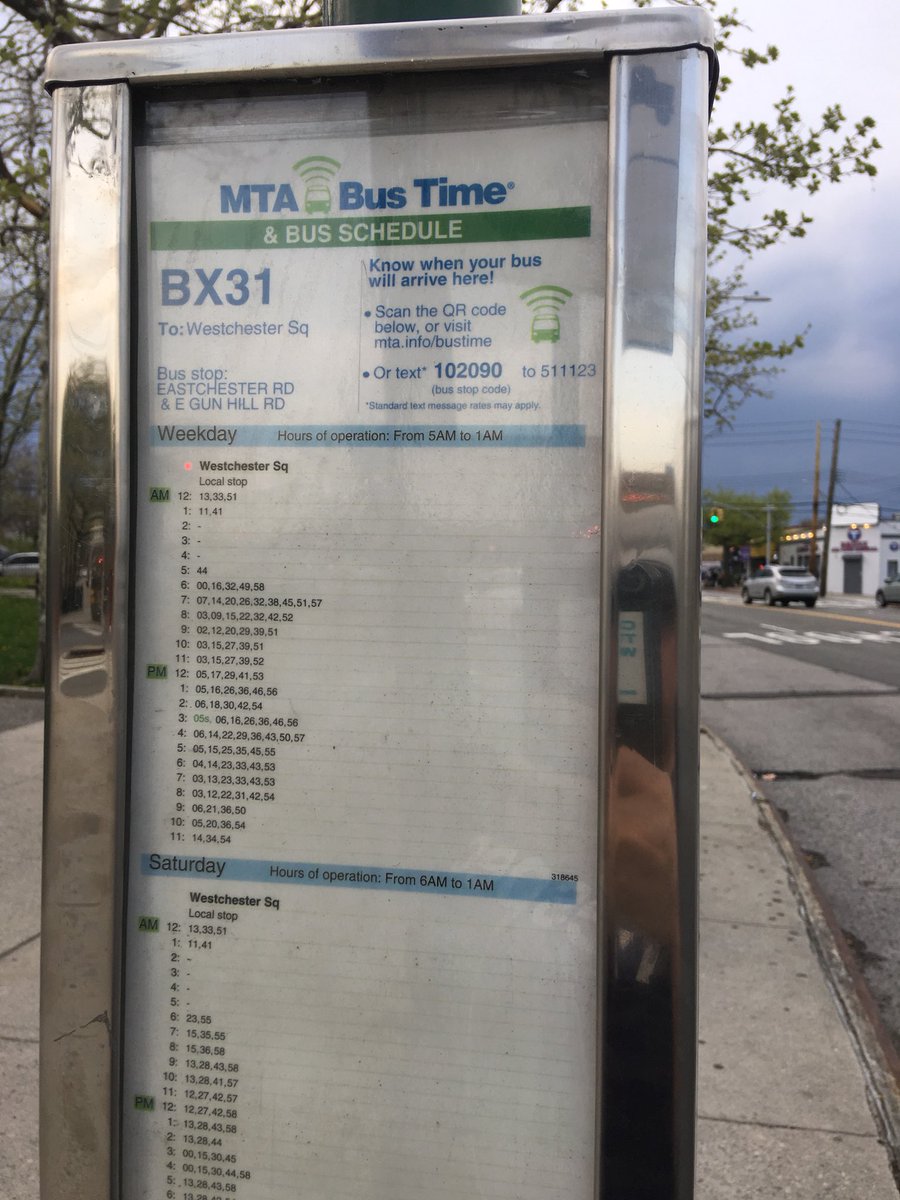
Navigating the New York City bus system efficiently requires understanding MTA Bus Time, a real-time tracking service that uses GPS technology to provide live arrival predictions. By accessing this system through official web portals, mobile apps, or text messaging, riders can reduce wait times and plan trips with precision by tracking bus locations and anticipated arrival intervals at specific stops.
Understanding the Mechanics of MTA Bus Time
MTA Bus Time is an integrated transit management and information system operated by the Metropolitan Transportation Authority (MTA). At its core, the platform functions by ingesting GPS data transmitted from every active bus in the MTA fleet. This data is processed through complex algorithms that account for current traffic conditions, historical route performance, and scheduled service frequency to generate highly accurate arrival estimates.
For the user, the service translates raw telematics into actionable transit intelligence. When you query a specific stop—identified by a unique six-digit "Bus Stop ID"—the system filters the global stream of bus locations to display only the vehicles relevant to your location and destination. Understanding that this system provides "predictions" rather than absolute certainties is critical; events such as heavy traffic, sudden mechanical issues, or route diversions can cause real-time estimates to fluctuate.
Accessing MTA Bus Time Effectively
The MTA provides multiple points of entry to their tracking ecosystem, ensuring accessibility regardless of whether you are a power user with a smartphone or a rider in an area with limited data connectivity.
The Official Web Portal
The primary interface for most riders is the browser-based MTA Bus Time website. This platform provides the most granular level of detail, allowing users to view map-based tracking of entire routes. When you land on the portal, you are presented with a search bar where you can input a bus route (e.g., M15) or a specific stop ID. The visual representation of the bus icon moving along the route line offers a secondary layer of confirmation beyond the text-based arrival time.
Mobile Applications and Integrated Tools
While the MTA provides a dedicated web experience, many riders integrate this data into third-party transit apps. These apps utilize the MTA’s open data API (Application Programming Interface) to pull the same information you see on the official portal. The advantage of these applications is often a more intuitive user interface, push notifications for service delays, and the ability to save "favorite" stops for one-tap access.
SMS and Text-Based Tracking
For users who do not have a consistent data plan or who are in an environment where mobile web access is inconvenient, the MTA provides an SMS service. By texting the six-digit Bus Stop ID to 511123, the system returns a text message with the upcoming buses for that location. This remains one of the most reliable ways to get information during high-stress situations or when your mobile device is low on battery.
The Role of the Bus Stop ID
The Bus Stop ID is the foundational unit of the MTA Bus Time system. Every single bus stop in the five boroughs is assigned a unique six-digit identifier. You can find this number physically posted on the "Bus Stop" sign at the street level, usually near the bottom of the pole or on the side facing the sidewalk.
When using digital tools, you do not always need the ID if you use the geolocation features of your phone, which allow the interface to pull stops nearest to your physical coordinates. However, knowing the ID is a crucial fallback. If you are planning a commute from your office or home, you can look up the ID for your preferred stop on the MTA website once and save it for future reference, bypassing the need to search for the route or navigate a map repeatedly.
Navigating Service Disruptions and Alerts
Even the most sophisticated tracking system cannot predict every outcome in a city as dynamic as New York. Occasionally, you may notice that a bus appears to disappear from the tracking map or that an arrival time suddenly shifts from "due" to "5 minutes."
Why Arrival Times Fluctuate
MTA Bus Time updates the countdown based on the bus’s actual movement. If a bus hits a red light, gets stuck in a traffic jam, or experiences a boarding delay (common during peak hours or heavy rain), the system recalibrates the remaining time. It is important to treat these times as estimates. If a bus is listed as "delayed," it often means the real-time data connection has been lost or the bus has deviated from its path, and the system is reverting to the static schedule.
Service Advisories
The MTA integrates its service alert system directly into the Bus Time interface. If a route is experiencing major delays due to construction, road closures, or special events (such as marathons or parades), a banner will appear within the tracking view. Always check these advisories if your wait time seems unusually long, as they provide the context that the raw GPS tracking cannot.
Comparison of Access Methods
Choosing the right way to check your bus status depends on your current situation and the level of detail you require.
| Access Method | Best For | Pros | Cons |
|---|---|---|---|
| Web Portal | Route-wide planning | Shows full map and traffic context | Requires active data connection |
| Third-Party Apps | Daily commuters | Highly customizable notifications | Data accuracy depends on developer |
| SMS (511123) | Emergency/Limited data | Quick, reliable, works on basic phones | Text charges may apply; minimal info |
| Signage/QR Codes | Spontaneous travel | Location-specific, no search needed | Requires physical proximity to stop |
Practical Strategies for Successful Commuting
To maximize the utility of MTA Bus Time, incorporate these strategies into your daily routine:
- Look for the "Real-Time" Indicator: When viewing arrival times, look for the word "Real-Time" or a specific color code (often blue or green) next to the arrival estimate. If this indicator is missing, the system may be showing a scheduled time, which is significantly less reliable than GPS-tracked data.
- Account for "Walking Time": Do not rush to the stop the second a bus is two minutes away if your walk takes three minutes. Use the tracking system to determine when to leave your current location, rather than when to arrive at the pole.
- Check Multiple Routes: If you are in a location served by multiple bus lines, the MTA Bus Time interface will often show arrivals for all of them. Use this to your advantage; if an M1 is delayed but an M2 stops at the same location and heads toward your destination, you can adapt your plan immediately.
- Verify the Direction: Ensure you are looking at the correct direction of travel. Many stops on opposite sides of the street look similar; a common mistake is checking the arrival time for the "Uptown" side while standing on the "Downtown" side.
Troubleshooting Common Issues
Despite the robustness of the system, users occasionally encounter glitches. If the service seems unresponsive, try the following steps:
- Refresh the Page: If using the web portal, a manual refresh ensures you are receiving the latest data packet.
- Verify Location Services: If the app is not finding your stop, ensure your phone's GPS is enabled and permitted to share data with the transit application.
- Check the Bus ID: If an SMS request fails, double-check that you entered the six-digit ID correctly. A single transposed number will lead to an error or data for the wrong location.
- System Outages: In rare cases, the MTA's backend systems may undergo maintenance. If the service is entirely down across all platforms, rely on the published paper schedule (if available at the stop) or alternative modes of transit.
Frequently Asked Questions
Does MTA Bus Time track every bus in the fleet?
Yes, the MTA has equipped the entire fleet with GPS hardware. However, rare hardware failures or signal "dead zones" can occasionally result in a bus disappearing from the tracker. In these instances, the bus is still in service, but its location is not being reported to the central server.
Is MTA Bus Time the same as the Subway tracking system?
No. While they are both part of the MTA’s "MYmta" digital strategy, the subway tracking system uses sensors located on the tracks to detect train positions, whereas the bus system relies on cellular-connected GPS transponders installed on each vehicle.
Can I track the bus from my computer before I leave home?
Yes, the web interface is optimized for desktop and mobile browsers. It is an excellent tool for checking the general status of your route before you head to the stop, allowing you to gauge if there are major delays that might necessitate a different transportation method, such as the subway or a Citi Bike.
Does the system show capacity or crowding?
As of 2026, many integrated third-party apps and the official MTA dashboard offer crowding information using a "people icon" indicator. This is estimated based on passenger load sensors at the doors, providing a helpful heuristic to decide whether to board the current bus or wait for the next one.
Is there a cost to use MTA Bus Time?
The MTA provides the tracking service free of charge. However, your mobile carrier may charge for SMS messages if you use the text-based 511123 service, depending on your individual mobile plan.
How do I report a missing or inaccurate stop ID?
If you encounter a bus stop sign with a missing or incorrect ID, you can report it via the MTA’s customer feedback portal or by contacting 511, the statewide transit information hotline. Ensuring these IDs are accurate helps the entire community of riders.
Recommendation for Daily Transit Users
For the most reliable experience, pair the MTA Bus Time web portal with a reputable, high-rated transit application that supports push notifications. Save your most frequently used stops as "favorites" within the app to ensure you have the fastest access to real-time data during your morning and evening commutes. By learning to interpret the distinction between "Real-Time" data and "Scheduled" estimates, you will significantly reduce the uncertainty of waiting at the curb and gain greater control over your daily transit experience in New York City.