AT&T Premier is a specialized online management platform designed for business customers to oversee their wireless accounts, purchase devices, and manage complex billing structures. In 2026, it serves as a critical component of the AT&T Business Center, providing administrators and employees with centralized tools for procurement, usage monitoring, and account hierarchy customization.
The Evolution of AT&T Premier and Business Center
As of 2026, the landscape of enterprise telecommunications management has shifted toward total consolidation. While the term "Premier" historically referred to a standalone portal, it has been largely integrated into the AT&T Business Center. This evolution was designed to eliminate the friction between managing wireline services (like fiber internet) and wireless services (mobile fleets).
However, the "Premier" branding remains the primary designation for the wireless-specific modules within this ecosystem. It continues to be the gateway for high-volume corporate accounts and small-to-mid-sized businesses (SMBs) that require more control than a standard consumer account offers. For business administrators, Premier is the engine that drives operational efficiency, allowing for the management of thousands of lines from a single dashboard.
Core Capabilities of the Premier Platform
The Premier platform is divided into several functional modules, each addressing a specific need within the business lifecycle. Understanding these modules is essential for maximizing the return on investment for your corporate mobile fleet.
1. Procurement and the e-Buy System
The e-Buy module is perhaps the most utilized feature of AT&T Premier. It allows authorized administrators to browse a customized catalog of devices—including the latest smartphones, tablets, and IoT hardware—at contract-negotiated pricing.
- Customized Catalogs: Organizations can restrict which devices employees see. For example, a company might only approve the use of specific iOS or Android models for security standardization.
- Approval Workflows: Premier allows for multi-level approval hierarchies. When an employee requests an upgrade, the request can be automatically routed to their department manager for financial approval before the order is processed.
- Bulk Ordering: For large-scale deployments, such as equipping a new sales team, Premier facilitates bulk SIM card and device orders with pre-configured service plans.
2. Billing and Financial Reporting
Managing a corporate wireless bill can be a logistical nightmare without granular tools. Premier provides "Invoices at a Glance" and deep-dive reporting capabilities.
- Hierarchy Management: Businesses can organize their accounts by Department, Region, or Cost Center. This ensures that the accounting department receives billing data that matches the company’s internal financial structure.
- Split Billing: One of the most powerful features for modern hybrid work environments is split billing. This allows a company to pay for the "business portion" of a mobile plan while the employee is automatically billed for overages or premium personal services.
- Historical Data: As of 2026, Premier maintains up to 16 months of detailed billing history online, allowing for year-over-year trend analysis of data consumption and roaming costs.
3. Account Self-Service and Maintenance
The self-service aspect of Premier reduces the need for businesses to call AT&T support for routine tasks. Through the portal, administrators can:
- Activate new lines and swap SIM cards (including eSIM profiling).
- Suspend or resume service for lost or stolen devices.
- Change rate plans for individual lines or entire groups to optimize costs based on actual usage patterns.
- Update user information, such as the name associated with a specific wireless number.
Eligibility and Access Requirements
Not every AT&T customer can access Premier. It is specifically reserved for business entities that meet certain criteria.
Business Identification
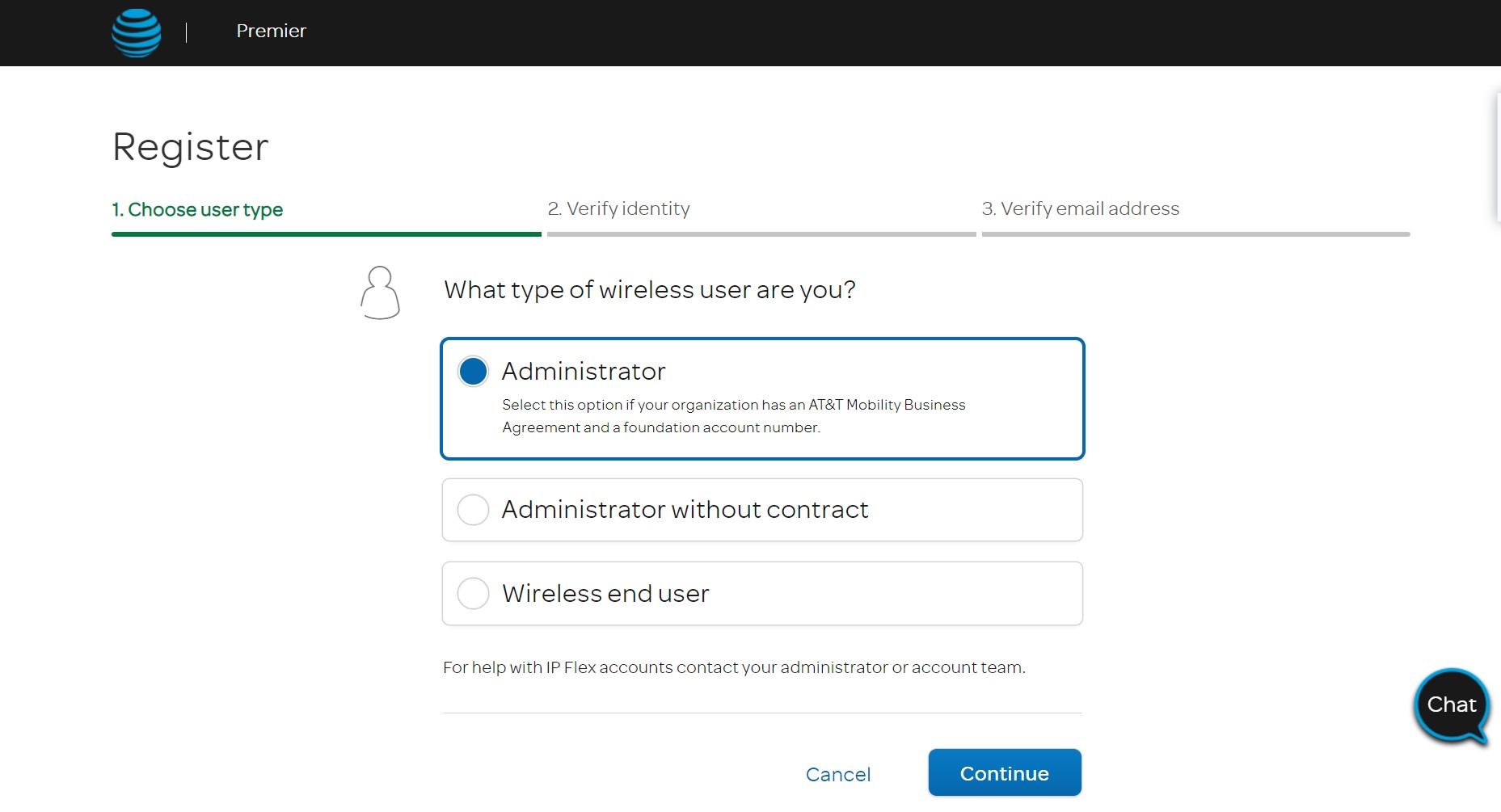
To register for a Premier account, you must have a valid Foundation Account Number (FAN). This number is assigned when a business contract is signed with AT&T. Small businesses can often obtain a FAN by providing a Tax ID (EIN) and demonstrating that the lines are used primarily for business purposes.
User Roles
Premier utilizes Role-Based Access Control (RBAC). When setting up the portal, the primary administrator can assign different levels of access:
- External Primary Administrator (EPA): Has full control over the entire account, including the ability to create other users.
- View-Only Users: Can see billing and usage reports but cannot make changes or order hardware.
- Purchasing Agents: Authorized specifically to buy hardware and accessories but restricted from changing plan structures.
Technical Specifications and Compatibility
In 2026, the Premier interface is optimized for modern web standards. To ensure a seamless experience, the following technical requirements are recommended:
| Feature | Requirement / Detail |
|---|---|
| Supported Browsers | Chrome (latest), Microsoft Edge, Safari, and Firefox. |
| Security | Multi-Factor Authentication (MFA) is mandatory for all admin logins. |
| Mobile Access | Managed via the AT&T Business Center mobile app (iOS/Android). |
| Integration | Supports API hooks for third-party TEM (Telecom Expense Management) software. |
| Data Export | Reports available in .CSV, .XLSX, and .PDF formats. |
Step-by-Step: Navigating Common Tasks in Premier
How to Register for Online Access
If your business has an AT&T contract but you haven't yet used the online portal, follow these steps:
- Navigate to the AT&T Business Center/Premier login page.
- Select "Register Now."
- Enter your Foundation Account Number (FAN) and a recent billing zip code.
- Verify your identity through the email or phone number associated with the contract.
- Create your user profile and set up your MFA preferences.
Managing an Employee Upgrade
To upgrade a device for a specific team member:
- Log in to the Premier dashboard.
- Go to the "I want to..." menu and select "Shop/Wireless."
- Choose the specific wireless number eligible for an upgrade.
- Select the new device and service plan.
- Check out using the stored corporate payment method or bill to the account (if eligible).
Premier for Employees (The Signature Program)
A significant sub-section of AT&T Premier is the AT&T Signature Program. This is the consumer-facing side of Premier. It allows employees of participating companies, students of specific universities, and members of certain organizations to receive discounts on their personal wireless accounts.
In 2026, this is managed through the Premier "Check Eligibility" portal. By entering a work email address, users can see if their employer has a negotiated "Premier" discount. These benefits often include:
- Waived activation fees.
- Discounts on monthly service plans (typically $10/month per line on premium plans).
- Discounts on accessories purchased through the Premier Online Store.
Troubleshooting Common Premier Issues
Despite its robust nature, users may encounter technical hurdles. Here are the primary solutions for common 2026-era issues:
Login Failures and Account Locks
If you are unable to log in, first ensure you are not using a bookmark to a legacy URL. The 2026 portal uses a centralized authentication system. If you enter the wrong password three times, the account will be locked for 30 minutes for security. Use the "Forgot Password" link to trigger an MFA-verified reset.
"Account Not Found" During Registration
This typically occurs if the FAN provided does not match the billing zip code on the master contract. Ensure you are using the zip code of the primary billing address, which may be a corporate headquarters rather than a local branch.
Device Pricing Discrepancies
If the price in the e-Buy cart does not match your contract, do not complete the purchase. This usually indicates that the "Contract Catalog" hasn't been refreshed. Contact your AT&T Account Manager to ensure your specific contract terms are correctly mapped to your Premier profile.
Comparing Premier to Standard Business Accounts
It is important to distinguish between a standard "Small Business" account (managed through the regular MyAT&T app) and a Premier account.
- Standard Business: Best for companies with 1–10 lines. It offers basic billing and plan changes but lacks the deep reporting and hierarchy tools.
- Premier: Essential for 10+ lines or any business requiring specialized billing. It provides the "Customized Catalog" and "Reporting" features that standard accounts lack.
Strategic Recommendations for 2026
For businesses looking to optimize their telecommunications spend, AT&T Premier should not be treated as a passive billing portal. Instead, it should be used as a strategic tool:
- Quarterly Usage Audits: Use the "Zero Usage" report in the Premier dashboard to identify lines that are being paid for but not used. This is a common source of "vampire costs" in large organizations.
- Standardize Procurement: Limit the e-Buy catalog to 2-3 device models. This simplifies internal IT support and allows for better bulk-pricing negotiations.
- Enable Employee Self-Service: Shift the burden of device upgrades to the employees by setting up the "Premier for Employees" portal, while maintaining final approval authority via the admin dashboard.
By leveraging the full suite of AT&T Premier tools, organizations can significantly reduce the administrative overhead associated with mobile fleet management while ensuring their workforce remains connected with the latest technology.
Frequently Asked Questions
Is AT&T Premier being replaced?
As of 2026, AT&T has integrated Premier's core functionality into the AT&T Business Center. While the name "Premier" is still used to describe the wireless management features and employee discount programs, the technical backend is part of the broader Business Center ecosystem.
Can I use AT&T Premier on my smartphone?
Yes. While the full administrative desktop site is best for complex reporting, the AT&T Business Center app provides mobile access to essential Premier features such as usage monitoring, SIM swaps, and basic billing tasks.
How do I find my Foundation Account Number (FAN)?
Your FAN can be found at the top of your monthly AT&T Business invoice. It is a 5- to 9-digit number. If you do not have access to a bill, your AT&T Account Manager can provide it after verifying your business credentials.
Does AT&T Premier charge a subscription fee?
Access to the Premier portal is included at no additional cost for AT&T Business customers. The fees associated with the account are strictly for the wireless services, hardware, and any optional premium features (like enhanced security suites) you choose to enable.
Why can't I see the latest iPhone or Samsung device in my Premier store?
This is usually due to "Catalog Restrictions" set by your company's External Primary Administrator. If a device is not in the "Approved" list for your company's contract, it will not appear in the e-Buy store.