The SDSU classes catalog is the official repository for San Diego State University’s academic programs, course descriptions, and degree requirements. To effectively use it, students must access the SDSU General Catalog online to understand curriculum standards and the my.SDSU portal to view real-time class schedules, check prerequisites, and complete semester-based registration.
Navigating the academic landscape at San Diego State University (SDSU) requires a firm grasp of two distinct but related systems: the General Catalog and the Class Schedule. As we move through the 2026 academic year, the university continues to refine its digital-first approach to academic planning. Whether you are a prospective student looking at potential majors, a current undergraduate planning your "MyMap" sequence, or a graduate student verifying thesis requirements, the catalog serves as your legally binding contract with the university regarding graduation requirements.
Understanding the SDSU classes catalog is not merely about finding a room number; it is about "Catalog Rights," prerequisite management, and ensuring that every unit earned counts toward your eventual degree.
The Distinction Between the General Catalog and the Class Schedule
For many students, the term "catalog" is used interchangeably with the list of classes available next Tuesday. However, in the SDSU ecosystem, these are separate entities that serve different purposes.
The General Catalog
The SDSU General Catalog is published annually. For the 2026-2027 academic cycle, the catalog outlines every course that is approved to be taught at the university. It includes the full course description, the number of units, any prerequisites or co-requisites, and how the course fits into General Education (GE) or major requirements.
Crucially, the General Catalog is where "Catalog Rights" are established. Your Catalog Rights are usually determined by the year you enter the university. If the requirements for a Psychology major change in 2027, but you started in 2026, you are generally held to the 2026 standards unless you choose to move to the newer catalog.
The Class Schedule (my.SDSU)
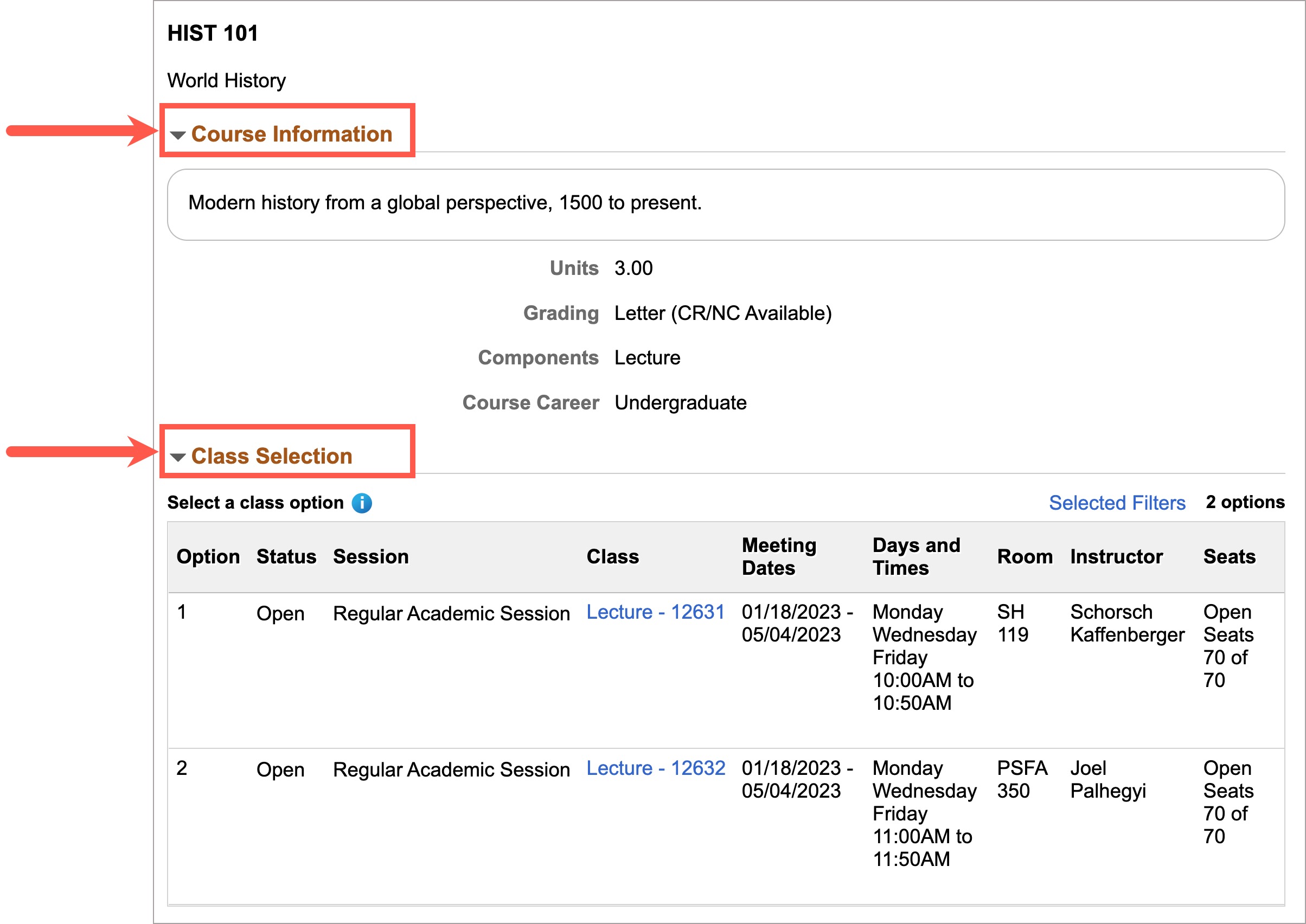
While the General Catalog tells you what courses exist, the Class Schedule tells you what is actually being offered in a specific term. Managed through the my.SDSU portal (the university's PeopleSoft-based management system), the schedule provides the "Who, When, and Where." This includes the specific professor, the day and time of the lecture, the room location (or Zoom link for online modalities), and the current enrollment capacity.
Navigating the 2026-2027 SDSU General Catalog
Accessing the official catalog is best done through the SDSU General Catalog website. The interface is designed to be searchable by department, course prefix, or keyword.
Understanding Course Numbering
SDSU uses a standardized numbering system that indicates the level of rigor and the intended audience for the course. Knowing these levels is vital for planning your four-year trajectory:
- 100–299 (Lower-Division): These are introductory courses typically taken by freshmen and sophomores. They focus on foundational knowledge and often fulfill "Foundations" requirements in General Education.
- 300–499 (Upper-Division): These courses are intended for juniors and seniors. They offer specialized knowledge within a major. Note that most majors require a specific number of upper-division units to graduate.
- 500–599 (Advanced Upper-Division and Graduate): These are bridge courses. They can often be taken by seniors with high GPAs or by Master’s students.
- 600–799 (Graduate Only): These courses are strictly for students enrolled in Master’s or Doctoral programs and focus on research, theory, and professional practice.
Prerequisites and Co-requisites
One of the most common mistakes students make is ignoring the fine print in the catalog descriptions. A prerequisite is a course that must be completed before you can enroll in the target class. A co-requisite is a course that must be taken at the same time. In 2026, the my.SDSU system has automated many of these checks, meaning the system may prevent you from even adding a class to your "shopping cart" if the catalog-defined prerequisites are not met.
Using my.SDSU for Real-Time Class Searches
The my.SDSU portal is the engine of the student experience. To search for classes in a specific semester, students log in with their SDSUid.
Advanced Search Filters
When the 2026 Fall schedule is released in April, the search volume can slow the system. Using advanced filters can save time. You can filter by:
- Mode of Instruction: Filter for "In-Person," "Fully Online," or "Hybrid."
- General Education Area: If you specifically need an "Area C: Humanities" course, you can filter the entire schedule to show only classes that satisfy that requirement.
- Waitlist Availability: You can choose to only see classes that are still open or those that have an active waitlist.
The Shopping Cart and Enrollment Appointments
Searching for classes is only the first step. Students add potential classes to a "Shopping Cart." However, having a class in your cart does not reserve a seat. Enrollment is dictated by an Enrollment Appointment, which is a specific date and time assigned to each student based on their unit count (seniors first, then juniors, and so on). In 2026, these appointments are strictly enforced, and being ready the minute your window opens is often the difference between getting a core major requirement or having to wait another semester.
Degree Evaluation and "MyMap" Integration
The SDSU catalog is best used in conjunction with the SDSU MyMap tool. MyMap provides a recommended four-year plan for every major offered at the university.
By cross-referencing your MyMap with the General Catalog, you can verify that the classes you are choosing satisfy the specific "Explorations" or "Foundations" categories required for graduation. For example, if your MyMap suggests a Social Science course in Semester 3, you can go to the General Catalog, look under "General Education Requirements," find the "Social and Behavioral Sciences" list, and choose a course that actually interests you rather than just picking a random number.
| Feature | General Catalog | Class Schedule (my.SDSU) |
|---|---|---|
| Primary Purpose | Official policy and course descriptions | Registration and scheduling |
| Timeframe | Annual (e.g., 2026-2027) | Semester-based (Fall, Spring, Summer) |
| Location Data | None (General descriptions) | Specific buildings and room numbers |
| Instructor Info | Rarely listed | Listed for every section |
| Prerequisites | Legally defined requirements | System-enforced enrollment blocks |
| Accessibility | Publicly available online | Requires SDSUid login |
General Education (GE) Requirements in 2026
Every student at SDSU, regardless of major, must complete the General Education program. The catalog organizes these into several key areas. As of 2026, the university continues to emphasize "Ethnic Studies" and "Lifelong Learning" as core pillars.
- Communication and Critical Thinking: Focuses on writing (RWS) and oral communication.
- Foundations of Learning: Introductory courses in Arts, Humanities, Social Sciences, and Natural Sciences.
- Explorations of Human Experience: These are upper-division (300+) GE courses. You cannot take these until you have completed 60 units and passed the Writing Proficiency Assessment (if applicable under your catalog year).
- Cultural Diversity: Many students look for courses in the catalog that "double count"—meaning they fulfill a GE requirement and the Graduation Requirement in Cultural Diversity simultaneously.
Special Considerations: Global Campus and Imperial Valley
The SDSU classes catalog also covers the SDSU Imperial Valley campus and SDSU Global Campus.
SDSU Imperial Valley
Students at the Calexico or Brawley campuses use the same General Catalog for degree requirements, but their Class Schedule is distinct. If you are a San Diego-based student, be careful when searching in my.SDSU to ensure the "Location" filter is set to "San Diego Campus," or you might accidentally register for a class two hours away.
SDSU Global Campus
Global Campus offers "Extended Studies" and online degree completion programs. These courses often have different fee structures (per-unit pricing) compared to the flat-rate tuition of the main campus. The catalog identifies these courses with specific section numbers or prefixes. It is vital to consult the Global Campus advisor to ensure these units transfer toward a traditional degree if that is your goal.
Troubleshooting Common Catalog Issues
Even with a streamlined digital system, students frequently encounter hurdles when navigating the SDSU catalog.
- The "Class Not Found" Error: If you see a course in the General Catalog but it doesn't appear in the my.SDSU search for Fall 2026, it likely means the department is not offering it that semester. Not all courses are taught every term; some are "Fall Only" or "Spring Only."
- Prerequisite Errors: If the system blocks you from a class you believe you are eligible for, it may be because your transfer credits haven't been fully articulated. In this case, you must contact the Office of the Registrar or the specific department chair to request a "Prerequisite Override."
- Cross-Listed Courses: Some classes are listed under two different departments (e.g., Latin American Studies and History). The catalog will note this as "Same course as..." You cannot earn credit for both, but you can register under either prefix to satisfy your requirements.
Frequently Asked Questions
How do I find the 2026-2027 SDSU General Catalog?
The 2026-2027 General Catalog is typically published online in late spring or early summer of 2026. You can find it at the official SDSU Catalog portal. If it is not yet live, the 2025-2026 version remains the active document for academic policies. The digital version allows you to export specific pages as PDFs, which is helpful for keeping a personal record of your major requirements.
Can I take a class if I don't meet the prerequisites listed in the catalog?
Technically, no. The my.SDSU registration system is programmed to block students who do not meet the criteria. However, if you have equivalent experience or took a similar course at a community college that hasn't posted to your transcript yet, you can contact the department to request a waiver. Each department has its own policy for granting these exceptions, often requiring a "Petition for Course Substitution or Waiver."
What does it mean if a course is "Variable Units" in the catalog?
Some courses, particularly internships (498), independent studies (499), or thesis work (799), are listed as 1–3 or 1–6 units. When you add these to your shopping cart in my.SDSU, the system defaults to 1 unit. You must manually change the unit count in the enrollment preferences screen before finishing your registration to ensure you receive the correct amount of credit for your workload.
How often are course descriptions updated in the catalog?
Course descriptions are updated annually through a process called "Curriculog." Faculty members propose changes, which are then reviewed by the University Senate. Once a change is approved and published in the new academic year's catalog, it becomes the new standard. If you are already taking a course and the description changes mid-semester, your requirements remain based on the catalog in effect when you started the course or established your catalog rights.
Where can I find the final exam schedule in the catalog?
The General Catalog does not contain the specific final exam dates, as these change every semester. Instead, you must visit the SDSU Registrar’s website and look for the "Final Exam Schedule" for the specific term (e.g., Fall 2026). Final exams are generally based on the day and time the class meets during the regular semester.
Final Recommendation for Students
For the most successful registration experience in 2026, do not wait until your enrollment appointment to open the catalog. Begin by reviewing your Degree Evaluation report in my.SDSU to see exactly which "red squares" (unfulfilled requirements) remain. Once identified, use the General Catalog to find interesting courses that fill those slots, and finally, use the Class Schedule to build several "Plan B" options in your shopping cart. If a class is full, always join the waitlist immediately; SDSU's auto-enrollment system is highly active during the first week of classes.